

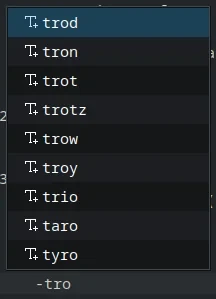
that’s how it worked in the last couple distros i tried but now on kubuntu it shows all kinds of (unhelpful) words. i tried disabling “keyword completion” but it did not change this behavior.
thanks for reading!
edit:
here is what it says under “components” in the “about” section:
Kate: 25.08.1
KDE Frameworks: 6.17.0
Qt: Using 6.9.2 and built against 6.9.2
Ubuntu 25.10 (Wayland)
Build ABI: x86_64-little_endian-lp64
Kernel: linux 6.17.0-14-generic
edit2: i tried upgrading kate to the latest (beta?) version 25.12.2 but now it’s not even launching…
I had a poke through Kate’s settings… try going to Editing > Auto Completion and turning off keyword completion?
It says
which sounds promising. I guess they just added e.g. “English” along with all the programming languages, heh (in a programming language it would autocomplete stuff like “if” and “for”).
… I tried turning it off though and it didn’t seem to help, which is weird, because it looks like it should.
– Ylfingr